StoreSoftware 12

Mitsubishi L300

Dedicated software for the supported Mitsubishi L300 MB91F573B instrument application, with original instrument and connection references.

Vehicle
Mitsubishi L300
MCU
MB91F573B
Operation
Offline Windows

One-time purchase. Permanent use on your activated PC. No annual fee; subsequent updates are free.

PC-bound activation. No licence transfer or reactivation support after changing computers or reinstalling Windows. Purchase details

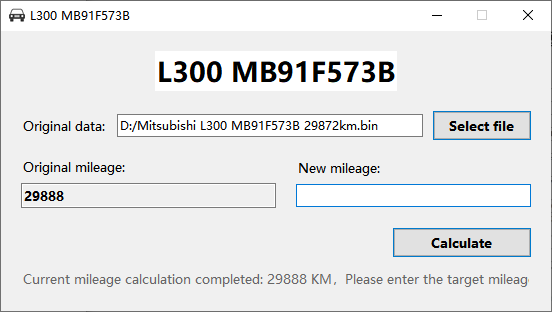
Mitsubishi L300 MB91F573B software showing a loaded instrument file

L300 instrument application

Confirm the complete MCU suffix, instrument identification and connection reference.

VehicleModuleChip reference
Mitsubishi L300Instrument clusterMB91F573B

Displayed-value behaviour

The supplied L300 notes mention a possible variance of several tens of kilometres. Confirm the expected behaviour for the exact instrument and verify its displayed result.

Keep the original read

Use the correct programmer and connection method for the instrument. Save the original file before processing it and verify the software's reading against the instrument.

Read the Software 12 notes in the Blog

Common questions

Compatibility, delivery and licence details for this software.

Does this cover every L300 instrument?

The listed application is the MB91F573B instrument. Confirm the exact part number and revision; other instruments need a separate compatibility check.

Will the displayed result always be exact?

The source notes describe a possible variance of several tens of kilometres. Confirm the expected behaviour for your application before purchase.

Is a connection reference available?

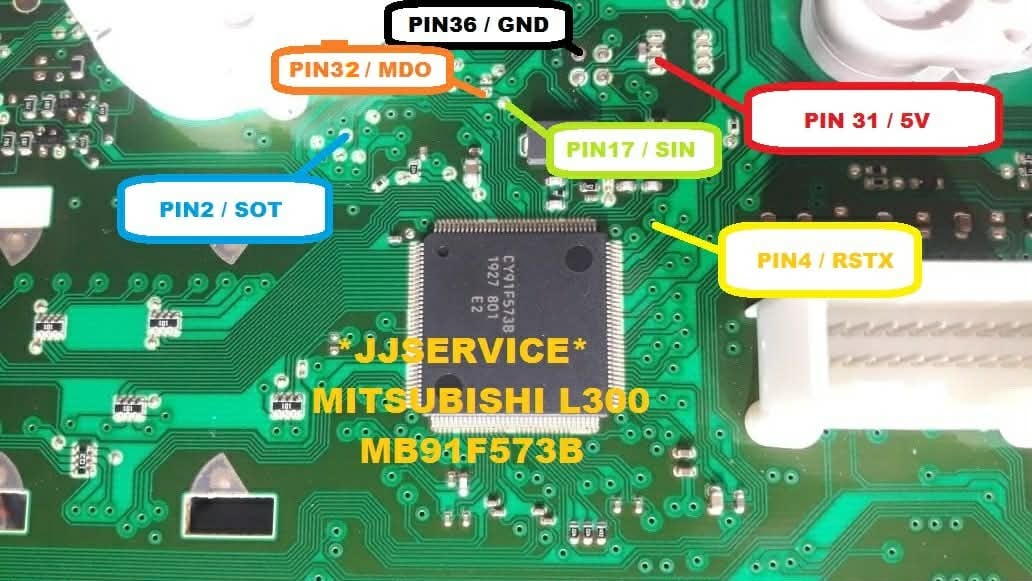
Yes. The supplied MB91F573B board diagram is shown above and opens at full size. Confirm it matches your instrument and programmer.

Is there an annual or renewal fee?

No. Software 12 is a one-time purchase with permanent use on the activated PC and free subsequent updates. Contact us for the current purchase price.

How is it delivered?

The software is supplied through a MEGA download link. Install it on your intended Windows PC, send us its PC code, and use the corresponding keycode we provide to activate it.

Can I change computers or reinstall Windows?

The licence is bound to the PC code submitted for activation. Licence transfer and reactivation support are not provided after changing computers or reinstalling Windows. Choose the intended PC and operating system before requesting activation.


Website analytics settings

Website analytics start automatically unless you have turned them off in this browser. You can turn analytics off or on here without affecting access to the website.

Privacy & cookies